Monitoring and Scheduled Checks
After its first Start, a custom API source reads the rest of your list in parts, then checks the API again on a schedule. See After the first Start for the order of work.
The schedule
| Setting | Default |
|---|---|
| How often the app looks for work | Every 5 minutes |
| Time between the end of one pass and the start of the next | 15 minutes |
| List pages read per step | Up to 10, within about 40 seconds |
Scheduled checks don't use the setup request budget (30 a minute). Organizations take turns, so one organization with many sources doesn't hold up the others.
Source status
Each custom API source on the Sources page shows a status chip next to its name. Every member of the organization sees it.
| Status | What it means | What to do |
|---|---|---|
| Initial import | The first full pass through your list is still running, or the documents it found are still processing. | Nothing. If the dialog also says New records wait until you raise the limit, the document limit was reached during the import (see Limit reached). |
| Syncing changes | A later pass found new or changed records, and they're processing. | Nothing. |
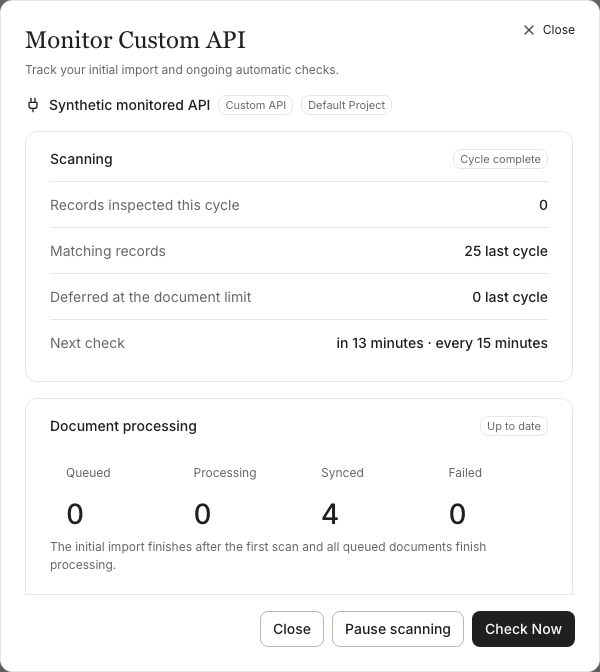
| Up to date | Nothing is queued or processing, and the source isn't held back by its limit. A later pass may already be reading the list (the Scanning badge says In progress), and some documents may have failed (the Document processing badge shows how many). | Nothing, unless Document processing shows failed documents: open View failed documents. |
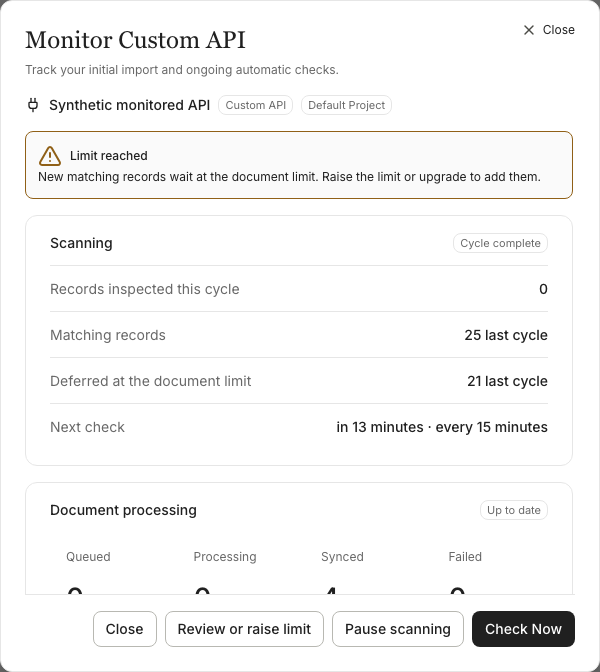
| Limit reached | Matching records were held back because the source is at its document limit. | Raise the limit or upgrade your plan. |
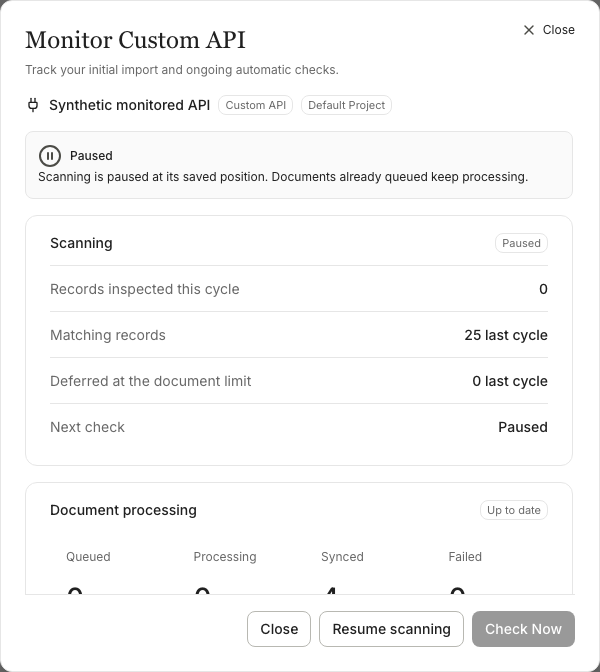
| Paused | An Owner or Admin paused scanning. Documents already queued still process. | Resume scanning when you're ready. |
| Waiting to retry | A check couldn't finish, and the source will try again by itself. The dialog says why and when. | Usually nothing. For missing credits, add credits; for unready settings, fix them in Settings. |
| Reconnect required | Your API refused the saved credentials. | Save new credentials, then Check Now (see Stopped sources). |
| Protocol error | Your API answered in a way the source can't safely continue from: broken pagination, a redirect, a record without an ID or two records with the same ID. | Fix the API or the source's settings, then Check Now. |
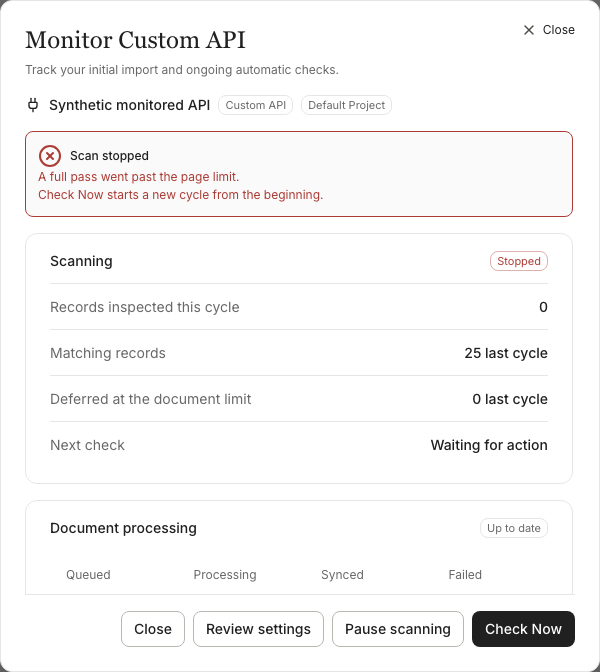
| Scan stopped | Scanning stopped after an error that won't clear by itself (shown as failed in the table below). | Fix the cause, then Check Now. |
| Review required | The source's settings changed. Nothing scans or processes until it's reviewed. | An Owner or Admin opens Review and chooses Start Sync. |
| Project archived | The source's project is archived. | Restore the project. |
| Syncing blocked | Syncing is paused for the whole organization, for example for unpaid storage or Terms not yet accepted. The dialog shows the reason. | Do what the message says. |
| Not started | The source was saved but never started. | Open Review and choose Start Sync. |
If the status can't be read, the chip is hidden rather than showing an old status.
The Monitor dialog
Choose Monitor on the source to open it. Members can open it too and see everything; only Owners and Admins see the controls. It has two panels, because reading your API and turning records into documents are separate jobs:
- Scanning reads your API's list. It shows the records inspected in the current pass, the matching records (the last pass's total once a pass finishes), the records held back at the document limit, and when the next check is due. The badge says whether a pass is In progress, Cycle complete, Paused, Waiting to retry, Authorization needed, Incomplete (protocol error) or Stopped.
- Document processing turns what scanning found into searchable documents: Queued, Processing, Synced and Failed. View failed documents opens them in Documents. Processing keeps going while scanning is paused or stopped. It's held (the badge says Held) while the source waits for review, while its project is archived and while syncing is blocked for the organization, and continues once that clears.
Below them, Checks shows the document limit, when the last pass finished and, if your API reports it, Provider credits remaining (see Provider credits). Owners and Admins also get the recurring-checks switch and the interval here.
The dialog refreshes every 10 seconds while it's open. If a refresh fails, it says the status may be out of date.
Pause and resume
Pause scanning (Owners and Admins) stops scheduled checks where they are and keeps the saved position. While a source is paused, Start answers This source is paused. Resume it to scan for records. and Check Now is unavailable. Documents already queued keep processing.
Resume scanning carries on from the saved position at the next scheduled run. You can't resume while the source waits for review or its project is archived; you can still pause then.
Check Now
Check Now (Owners and Admins) makes the source due for a check straight away instead of waiting for the interval, or at its retry time if it's waiting to retry. The confirmation says when it's eligible. The app looks for due sources every 5 minutes and takes a limited number each time, and it doesn't scan a source while that source's documents are still being imported, so the check can start a little later.
Check Now is also how you restart a stopped source once you've fixed the cause:
- Reconnect required: save new credentials in Edit Custom API (the dialog's Edit credentials opens it), then Check Now.
- Protocol error and Scan stopped: fix the API or the settings (Review settings), then Check Now.
- After a pass went past 100,000 pages, or the saved position expired a second time in one pass, Check Now starts a new pass from the beginning instead of continuing. The dialog says so before you choose it.
With recurring checks off, Check Now runs one pass, and nothing follows it.
Recurring checks and the interval
- Recurring checks on (the default): when a pass reaches the end of your list, the next one starts after the check interval. Choose 5, 15, 30 or 60 minutes, 4 hours or a day; the default is 15 minutes. A new interval applies from the end of the current pass.
- Recurring checks off: no new pass starts on its own. The pass under way (including the first one) still finishes, and Check Now still runs one pass.
The interval is the time between finished passes. A pass that isn't finished continues at the app's next 5-minute look, whatever the interval.
Limit reached
When a pass finds more matching records than the limit allows, the extra ones are held back and counted: Deferred at the document limit in the Monitor dialog (the last pass's count once it finishes), and Limit reached on the source. During the first import this shows as a note, New records wait until you raise the limit, instead.
Documents the source already tracks keep refreshing at the limit. To add the held-back records, raise the source's limit (Review or raise limit opens it) or upgrade your plan, then approve the review; the next pass adds them. Nothing is removed when the limit is reached.
When a scheduled check fails
A failed check never deletes documents and never turns the source off. What happens next depends on the cause:
| Cause | What happens | What to do |
|---|---|---|
Your API's rate limit (HTTP 429, or a 403 that carries a Retry-After header, or an X-RateLimit-Remaining or RateLimit-Remaining of 0) | Waits as long as the API asks (1 second to 1 hour; 1 minute if it doesn't say), then tries again. See Rate limits answered with 403 | Nothing |
| Not enough credits for the new documents | Waits 1 hour, then tries again. Auto-recharge, if you turned it on, may top up the balance | Add credits |
| The project's vector store or embedding model isn't ready | Waits 1 hour, then tries again | Check Settings → Vector Store and Settings → Embedding Model |
| The API refused the credentials (HTTP 401, or 403 without rate-limit headers) | Stops: reconnect required | Enter new credentials in Edit Custom API |
| The API broke the pagination settings, redirected, or returned records without IDs or with repeated IDs | Stops: protocol error | Fix the API or the settings |
| The saved settings no longer work, the API refused the list's first page (HTTP 400 or 410), or the pass passed 100,000 pages | Stops: failed | Fix the cause |
| The saved position expired (HTTP 400 or 410 when continuing from a cursor, link, page or offset) | Starts a new pass from the beginning, once. A second expiry in the same pass stops it: failed | Usually nothing. See below |
| Anything else (network errors, other HTTP errors, unreadable responses) | Tries again after 5, 15, 60 and 60 minutes. The fifth failure in a row stops it: failed | Check the API is reachable |
Stopped sources
A stopped source shows Reconnect required, Protocol error or Scan stopped on its row, and a red note in the Monitor dialog with the reason. It stays stopped until an Owner or Admin fixes the cause and chooses Check Now (see Check Now). Its documents stay searchable meanwhile.
If your API stops accepting the saved position, the source restarts the pass from the beginning by itself, once, and the dialog shows Restarted from the beginning.
Provider credits
Some APIs, such as Zoho CRM, report how many of their own API credits you have left. When yours does, the Monitor dialog shows Provider credits remaining. These are your API provider's credits, not Vectord credits.
Refreshes after an update or a mapping change
- After the update that added scheduled checks, the first pass refreshes each existing custom API document once, as it reaches its record. Documents whose records your API no longer returns keep their current content.
- After you change a source's mapping (title, text fields, link or last-updated field), the next pass after you approve the review refreshes each tracked document as it reaches its record. Before you save, Edit Custom API shows how many tracked documents that is and the most it can cost: 20 credits each, or 40 with Enhanced Sync (Contextual Retrieval). Documents whose records your API no longer returns keep their current content.
Record IDs must be unique
Two records with the same ID in one step stop the source with Protocol error. A repeat that appears only in a later step isn't detected, so make sure every record's ID is unique across your whole list.
Expired positions
Some APIs only honour a cursor or page token for a limited time; one CRM, for example, expires page tokens after 24 hours and ties them to the request's parameters. If a pass waits too long between steps, the next request is refused and the source starts the pass again from the beginning. Documents already imported stay; records already tracked are matched by their ID.
See Troubleshooting for each cause in detail.